Security reference
Deployment architecture and data flows
Each supported Particle deployment drawn with every data boundary: processing, storage, logs and the external services involved.
Current controls
Particle runs inside your own cloud account, the way most self-hosted open-source platforms do: a set of container images in a Kubernetes namespace, a managed PostgreSQL database and an object storage bucket, all on a private network you control. Source data is read, staged, transformed and loaded from inside that boundary. Nothing is sent to Particle the company, and the deployment needs no connection back to us to run.
The application is two images, built from one source tree and released under one version: a web image that serves the screens and the API, and a worker image that runs every pipeline step. Because both carry the same pipeline definitions, a worker can never run a different version of a template from the one the screens show. Two open-source components run beside them, pinned by digest: the Temporal workflow engine, which makes every run durable so that a restart resumes a step instead of repeating it, and a document parser that reads PDFs and scans with no network access.
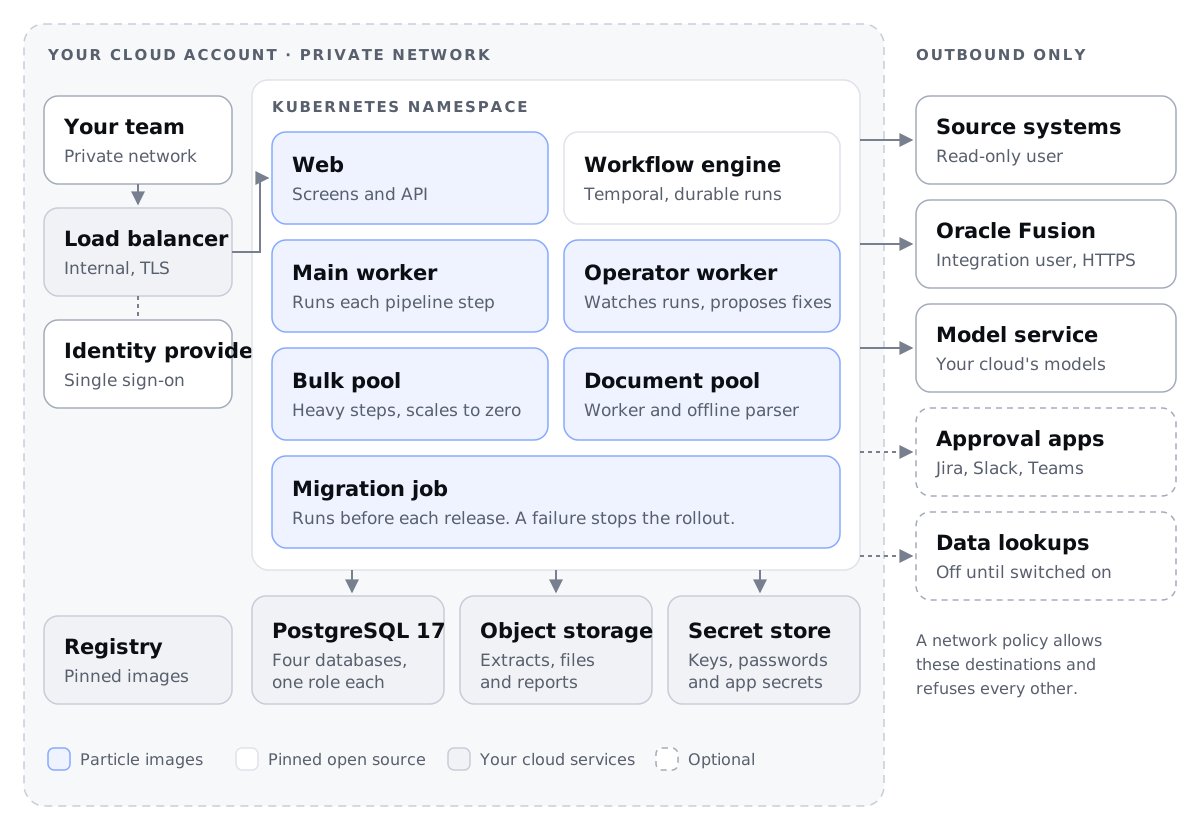
Inside the namespace the workers run in roles. The main worker runs each pipeline and its lighter steps. The operator worker runs the agent that watches a pipeline's runs and proposes fixes. The bulk pool takes the memory-heavy steps (staging an extract, running the transform, validating import files) on its own high-memory nodes, and scales to zero when nothing is converting. The document pool runs the parser beside its worker, for pipelines that read contracts or forms. Every release first runs a migration job, so a schema change and the code that needs it arrive together, and a failed migration stops the rollout before any pod changes.
You provision six things, all of them standard managed services:
| Resource | Holds | AWS · Azure · Google Cloud · OCI |
|---|---|---|
| Kubernetes cluster | Web, workers, workflow engine, parser | EKS · AKS · GKE · OKE |
| PostgreSQL 17 | Application data, run history, staged extracts | RDS · Azure Database for PostgreSQL · Cloud SQL · OCI Database with PostgreSQL |
| Object storage | Extracts, import files, parsed documents, reports | S3 · Blob Storage · Cloud Storage · OCI Object Storage |
| Secret store and keys | Encryption keyring, database passwords, app secrets | Secrets Manager and KMS · Key Vault · Secret Manager and Cloud KMS · OCI Vault |
| Container registry | Every image, mirrored by digest | ECR · ACR · Artifact Registry · OCIR |
| Private load balancer | HTTPS to the web pods, inside your network | ALB · Application Gateway · Cloud Load Balancing · OCI Load Balancer |
One PostgreSQL instance carries four databases, each owned by its own role. The application database holds projects, mocks, pipelines, the status of every source row and the agents' conversations. Two databases hold the workflow engine's history and search index. The staging database is where each extract is loaded once, so every later step queries it instead of re-reading files; its owner may create databases and nothing more, and queries an agent writes run as a separate read-only role. A privileged role creates all of this at install and is never given to the application.
Credentials Particle holds on your behalf, such as the source database password, the Oracle Fusion integration user's password and the tokens for Jira or Slack, are encrypted by the application before they are written to PostgreSQL. The keys sit in your secret store as a keyring, so a key can be rotated without downtime, and anyone who reads the database without them sees ciphertext.
By deployment
The architecture is the same on every cloud; only the managed services underneath change. Three choices differ, and each is worth settling before the first install.
Identity for the pods. Workers read and write the bucket and sign short-lived download links, so a person downloading a file fetches it from storage directly and the bytes never pass through the web pods. Give the pods your cloud's workload identity (IAM roles for service accounts on AWS, workload identity on Azure and Google Cloud, OKE workload identity on OCI) and no long-lived storage key exists anywhere.
Which models it uses. Particle uses the models you already run. Its agents are built on Mastra, an open-source agent framework, so any provider or gateway Mastra supports can serve them: Amazon Bedrock on AWS, Azure AI Foundry on Azure, Vertex AI on Google Cloud, or a gateway you already route model traffic through. Switching provider is a configuration change, not a code change. Reach your cloud's model service over a private endpoint and prompts never leave your account. Which data reaches the model is covered on the AI data use page.
How people reach it. The web pods sit behind an internal load balancer, reached over your VPN or private connectivity, with sign-in through your identity provider. If approvals are answered in Slack, Slack must reach one callback route: expose that path alone, behind a web application firewall, never the whole application.
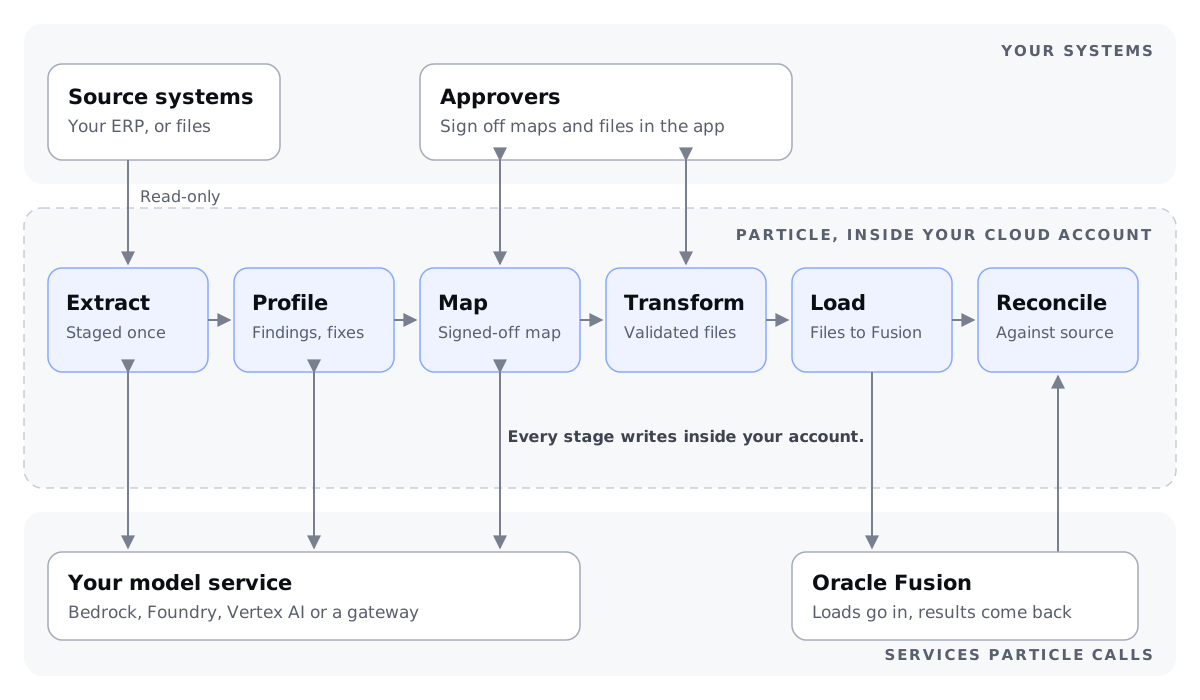
Every connection in figure 2 is opened from inside the namespace except people signing in. Sources are read with a read-only database user over your private network, or arrive as uploaded files. Oracle Fusion receives import files and REST calls as an integration user you create, and the reconcile step reads back what loaded. Jira, Slack, Teams and the data lookups (address validation, tax registries) are each off until a project switches them on. A network policy on the namespace allows exactly these destinations and refuses the rest.
Logs stay in the account too. Every component writes structured events to standard output, where your cluster's own log pipeline collects them, and the run history, approvals and the record of every agent action are rows in your database. Particle receives no telemetry from your deployment.
For sizing, a first project runs on two general-purpose nodes of 2 vCPU and 8 GB each, plus a bulk pool of up to two 4 vCPU, 32 GB nodes that exists only while a heavy step runs. The parser image is about 10.5 GB and needs 2 GB of memory resident, so give the nodes that run it 100 GB disks.
Shared responsibilities
You own the cloud account and network, the cluster's nodes and their patching, database backups and point-in-time recovery, the encryption keys, your identity provider and who holds an account, and the credentials for your source and target systems.
Particle owns the images and their pinned dependencies, the deployment manifests, the database migrations, and the notes for each release saying what changed and what it requires.
Upgrades are shared. We publish a release; you choose the window. A new release takes new runs while runs already in flight finish on the version they started on, so an upgrade does not stop work mid-load. Particle staff have no standing access to your deployment. When you want help, you grant time-boxed access and remove it afterwards.
Limits
- This page describes the reference architecture for running in your account. Our current manifests are written for Kubernetes on Google Cloud; the equivalents for AWS, Azure and OCI are prepared and confirmed for each deployment during scoping.
- Production needs Kubernetes. A single machine with Docker Compose is enough to evaluate Particle, not to run a conversion.
- The deployment is not air-gapped. Oracle Fusion is a cloud service, so a path to it is always needed.
- Each release is tested against named models. A model your cloud provides is checked on your own data before the first mock, because agents do not behave identically on every model.
- Nothing on this page is a certification. Assurance covers what has been independently assessed.
How to verify
- Compare the image digests in the release notes with what your registry holds and what the pods are running.
- Read the namespace's network policy, then try a host it does not list from a worker pod and confirm the connection is refused.
- Connect to PostgreSQL as each role and confirm what it can and cannot do, starting with the staging read-only role.
- Confirm the bucket blocks public access and that the pods' identity can reach that bucket and nothing else.
- Run a test conversion with egress logging on, and match every outbound connection against figure 2.